> For the complete documentation index, see [llms.txt](https://docs.rootcause.ai/llms.txt). Markdown versions of documentation pages are available by appending `.md` to page URLs; this page is available as [Markdown](https://docs.rootcause.ai/more-details/build-digital-twin/tuning-for-fit.md).

# Tuning for Fit

A first training run rarely produces the best model. Tuning is the loop that follows: adjust the build configuration, retrain, watch the fit score move, and repeat until the model is good enough to act on. This page explains how to read fit and which controls move it most.

It builds on [Configuration to Build Digital Twin](/more-details/build-digital-twin/build-configuration.md), which documents every control; here we cover how to *use* those controls to improve a model.

***

## Reading model fit

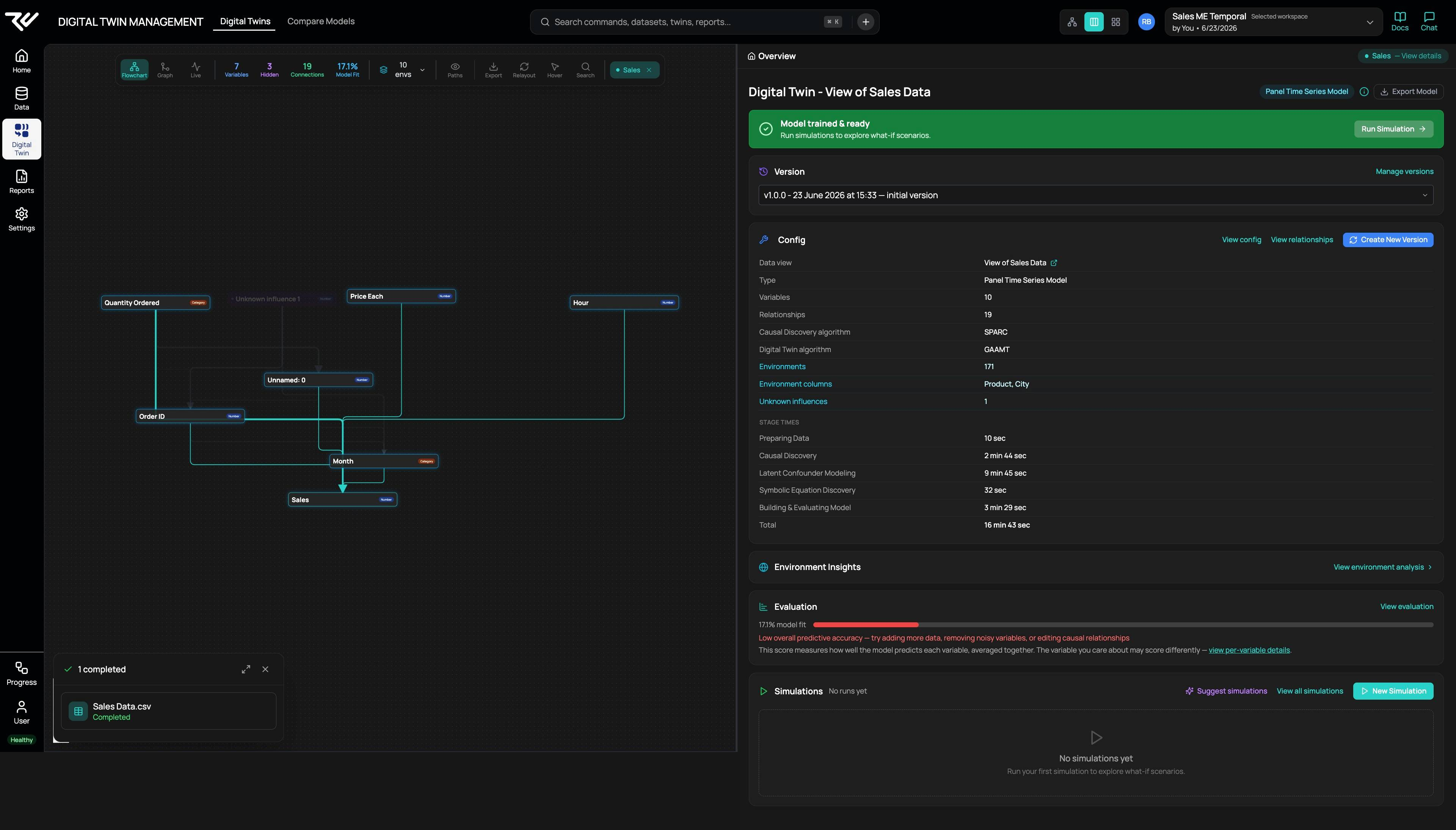
After training, the twin's Home shows a **model fit** percentage — how well the model predicts each variable, averaged across all of them. A low score comes with a prompt to act:

> Low overall predictive accuracy — try adding more data, removing noisy variables, or editing causal relationships.

<figure><img src="/files/yQ7P6beWiIBEGekXwVwE" alt="A trained twin&#x27;s Home showing a 17.1% model fit with a low-accuracy warning"><figcaption><p>A first run with a poor fit — 17.1%. The averaged score is the headline, but the variable you care about may score differently.</p></figcaption></figure>

One number rarely tells the whole story. The fit is an average, so a model can predict the outcome you care about well while scoring poorly on variables you don't. Always check the per-variable breakdown before judging a model — see [Reviewing Model Quality](/more-details/digital-twin/model-quality.md).

***

## The tuning loop

1. Build and train the twin ([Configuration to Build Digital Twin](/more-details/build-digital-twin/build-configuration.md)).
2. Read the fit score and the per-variable detail.
3. Change **one** thing.
4. Save as a new version and retrain.
5. Compare against the previous version, and keep the better one.

Every retrain creates a new version, so you can compare runs side by side and roll back if a change makes things worse — see [Version History](/more-details/digital-twin/version-history.md) and [Model Comparison](/more-details/digital-twin/model-comparison.md).

***

## The biggest lever: environment columns

For a multi-environment twin, the single largest influence on fit is **how many columns define your environments**. Each unique combination of the selected columns becomes one environment, and each environment needs at least 10 rows of history to learn from. Select too many columns and the data shatters into many tiny environments, each with too little history — fit suffers, and you may hit the "no environment has at least 10 rows" error.

To see the effect, take an example dataset — a table of sales orders, each tagged with a **product** and a **city**, recorded over time. (Just one example; your data will differ.) Changing the environment columns changes the result sharply:

| Environment columns | Environments | Rows each | Model fit |
| ------------------- | -----------: | --------: | --------- |
| Product **+** City  |          171 |   \~1,087 | 17.1%     |
| Product only        |           19 |   \~9,787 | **29.1%** |

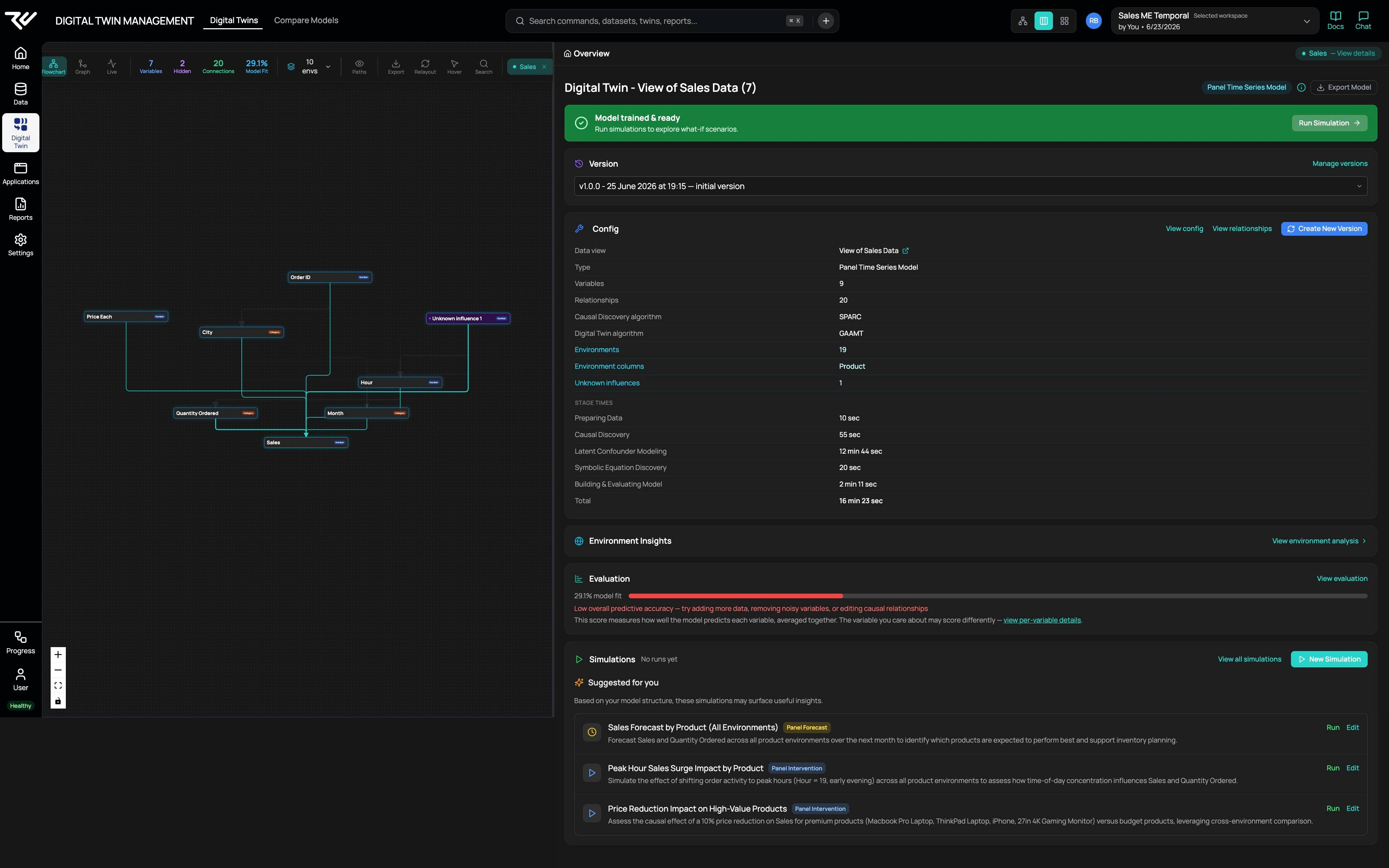
In the sales data example, dropping City left fewer, larger environments — each with far more history — and fit improved substantially, from 17.1% to 29.1%. (This better run also added prior knowledge and corrected the variable ordering, below, so the gain reflects several tuning steps together — which is how tuning usually works in practice.)

<figure><img src="/files/4ey391Bld3k1z3evAsZ1" alt="The retrained twin&#x27;s Home showing model fit improved to 29.1% after reducing the environment columns to Product only"><figcaption><p>The retrained twin after dropping City to leave 19 environments — fit rose to 29.1%.</p></figcaption></figure>

Note that 29.1% is still flagged as low. That is the point of the per-variable view: an averaged score can be modest while the model predicts the variable you actually care about well — so judge the model on the outcome that matters, not the headline number (see [Reviewing Model Quality](/more-details/digital-twin/model-quality.md)).

The rule of thumb: **start coarse and add granularity only if fit holds.** Begin with the smallest set of environment columns that still reflects how your business actually differs, and split further only when the data supports it.

***

## Other levers

When environment columns aren't the issue, or you have already tuned them:

* **Fields** — remove noisy or irrelevant variables that add confusion without explanatory power.
* **Causal relationships** — add relationships you know to be real, block ones you know to be impossible, or edit individual edges. See [Inspecting Causal Relationships](/more-details/digital-twin/causal-relationships.md).
* **Training options** — keep **Account for hidden factors** and **Show the formula** on for a more defensible, interpretable model.
* **More data** — a longer history or more records per environment is often the most direct fix.

***

## Check the variable ordering

The build screen suggests **variable ordering** automatically — constraints such as *"Sales must come after Order Date."* These suggestions are generated for you and are a useful starting point, but they are **not infallible**: some will not reflect how your domain actually works.

Walk through each ordering rule and confirm it makes real-world sense before you train. A wrong rule quietly forces — or forbids — a causal direction, and that can pull the whole model off course. Correcting nonsensical ordering constraints is one of the simplest ways to improve a model.

***

## Knowing when to stop

Fit is a means to a decision, not a target in itself. Stop tuning when the model predicts the variable you care about well enough to act on — even if the averaged fit score is not high. A model that nails your key outcome and is honest about the rest is more useful than one chasing a higher average.

***

## Other Build a Digital Twin pages

* [Selecting your Data View](/more-details/build-digital-twin/selecting-data-view.md) — choosing the data and reading the auto-filled configuration.
* [Types of Digital Twins](/more-details/build-digital-twin/twin-types.md) — Static, Temporal, and the two Multi-Environment variants.
* [Configuration to Build Digital Twin](/more-details/build-digital-twin/build-configuration.md) — every control on the build screen.

See [Reviewing Model Quality](/more-details/digital-twin/model-quality.md) for reading fit in depth, and the [Digital Twin overview](/more-details/digital-twin.md) for the bigger picture.