> For the complete documentation index, see [llms.txt](https://docs.rootcause.ai/llms.txt). Markdown versions of documentation pages are available by appending `.md` to page URLs; this page is available as [Markdown](https://docs.rootcause.ai/installation-and-deployment/architecture.md).

# Architecture & Security

This page describes what the RootCause Platform is made of, where each component runs, the choices the bootstrap wizard puts in front of you, and how the platform is secured, scanned and retained.

The platform is deployed into your own Kubernetes cluster by the RootCause Operator. Nothing runs in RootCause infrastructure, and platform data never leaves your cluster.

***

## Platform components

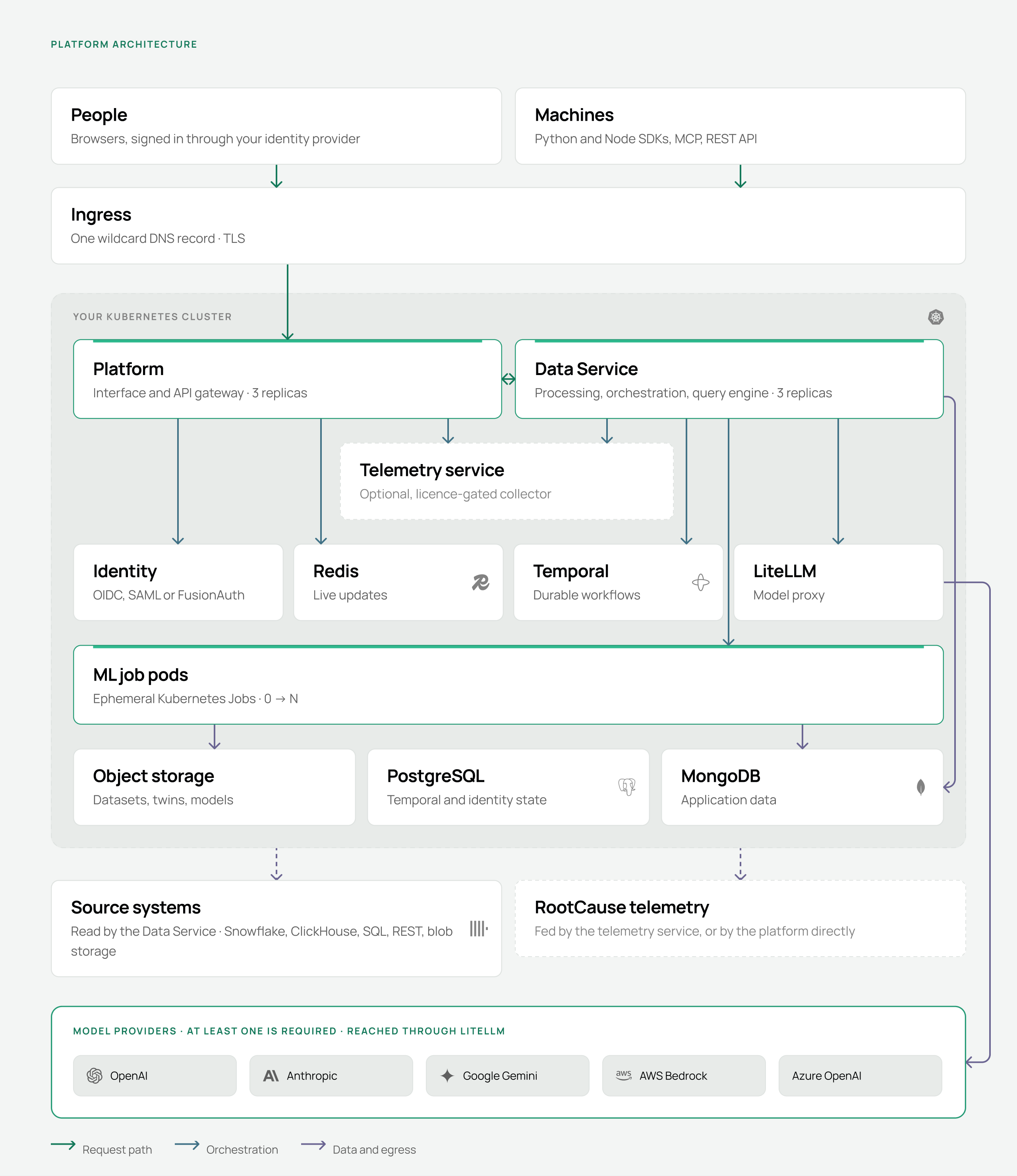
<figure><img src="https://1662811113-files.gitbook.io/~/files/v0/b/gitbook-x-prod.appspot.com/o/spaces%2FBXg3gZLR0e2Q8SzeQmql%2Fuploads%2Fgit-blob-0d44ff464c50b6ad1389351144849268ea1d8d7c%2Frc-arch-platform.png?alt=media" alt="The RootCause platform architecture: people and machines enter through an ingress controller into a Kubernetes cluster containing the Platform and Data Service, an optional telemetry service, the Identity, Redis, Temporal and LiteLLM dependencies, ephemeral ML job pods, and the MongoDB, PostgreSQL and object storage datastores, with model providers, source systems and RootCause telemetry outside the cluster"><figcaption><p>Green marks RootCause components; dashed outlines mark what is optional or off by default.</p></figcaption></figure>

The RootCause components are the Platform, the Data Service, the ML job pods they dispatch, and the optional telemetry service.

| Component         | What it does                                                                                             | Scale      |
| ----------------- | -------------------------------------------------------------------------------------------------------- | ---------- |
| Platform          | The interface people use, and the API gateway in front of everything else                                | 3 replicas |
| Data Service      | Data processing, orchestration, ontology and LLM work, and the in-process query engine                   | 3 replicas |
| ML job pods       | One ephemeral Kubernetes Job per task — causal discovery, digital twins, simulation, ontology extraction | 0 → N      |
| Telemetry service | Licence-gated collector for usage events and errors, off by default                                      | 3 replicas |

Browsers, the Python and Node SDKs, the MCP server and the public REST API all arrive through one ingress controller, authenticate against your identity provider, and talk to the Platform. The Platform proxies to the Data Service over HTTP and WebSocket.

The Data Service does not run heavy compute in a request handler. Causal discovery, twin training, simulation and ontology extraction are dispatched as Kubernetes Jobs, one per task, which run to completion and are then removed.

LiteLLM is the only component that talks to model providers. Every call to OpenAI, Anthropic, Google, AWS Bedrock or Azure OpenAI — or to a model you host yourself — goes through it, so provider keys live in one place.

***

## Deployment topology

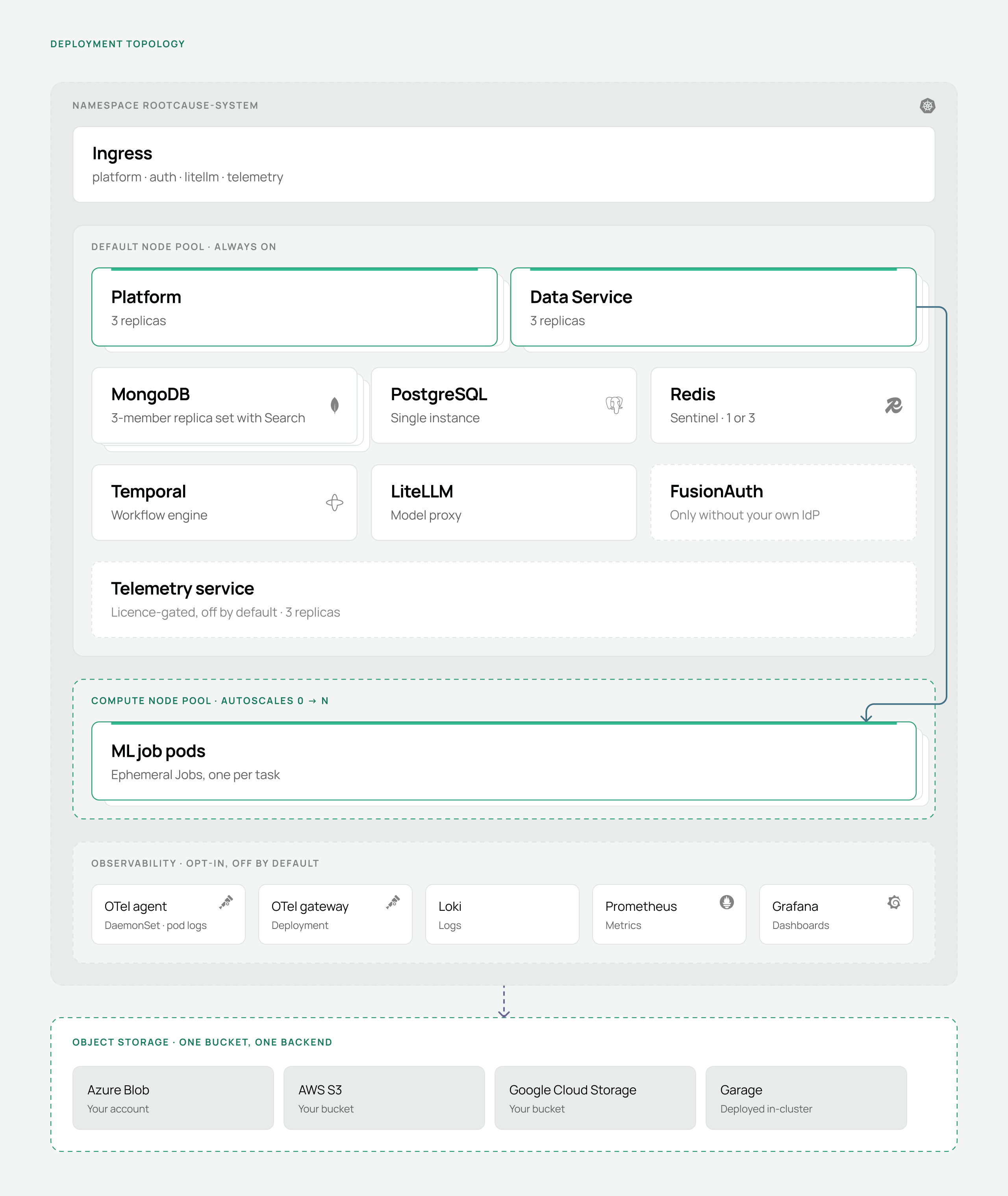
<figure><img src="https://1662811113-files.gitbook.io/~/files/v0/b/gitbook-x-prod.appspot.com/o/spaces%2FBXg3gZLR0e2Q8SzeQmql%2Fuploads%2Fgit-blob-644a8c657f022ca6f2f3f5dcaeb8ded9df129929%2Frc-arch-deployment.png?alt=media" alt="The deployment topology: a Kubernetes namespace containing an ingress, a default node pool with the Platform and Data Service at three replicas each plus MongoDB, PostgreSQL, Redis, Temporal, LiteLLM, optional FusionAuth and an optional telemetry service, a compute node pool that autoscales from zero for ML job pods, an opt-in observability block with the OTel agent, OTel gateway, Loki, Prometheus and Grafana, and a dashed object storage block listing Azure Blob, AWS S3, Google Cloud Storage and in-cluster Garage"><figcaption><p>One namespace, two node pools, and one bucket on a backend of your choosing.</p></figcaption></figure>

Everything is deployed into a single namespace, `rootcause-system`. One wildcard DNS record and one TLS certificate cover the hostnames: `platform`, `auth`, `litellm`, and `telemetry` when the collector is self-hosted.

PostgreSQL, MongoDB, Redis, Temporal and LiteLLM are deployed in-cluster by default, and each can instead point at an instance you already run — set that in the bootstrap wizard and the operator skips deploying it. The object store and the identity provider are always external choices.

MongoDB is deployed as a 3-member replica set with MongoDB Search, managed by the unified MongoDB Kubernetes Operator (MCK).

> The legacy MongoDB Community Operator cannot deploy MongoDB Search and is rejected by the operator's preflight checks.

***

## Cloud differences

The deployment is identical on AKS, EKS and GKE except for the following.

|                         | Azure                               | AWS                                            | Google Cloud                |
| ----------------------- | ----------------------------------- | ---------------------------------------------- | --------------------------- |
| Managed Kubernetes      | AKS                                 | EKS                                            | GKE                         |
| Storage class           | `managed-csi`                       | `gp3`                                          | `standard` or `premium-rwo` |
| Object storage          | Azure Blob Storage                  | S3                                             | GCS                         |
| Ingress                 | Application Gateway (AGIC) or nginx | nginx or ALB Ingress Controller                | nginx or GCE Ingress        |
| Compute pool autoscaler | Built-in cluster autoscaler         | Cluster Autoscaler or Karpenter, self-deployed | Built-in cluster autoscaler |

Every cluster needs Kubernetes 1.26 or newer, Helm 3.12 or newer, amd64 nodes, and SSD-backed persistent volumes.

> Azure Application Gateway requires additional ingress annotations and path configuration. The [Deployment Guide](/installation-and-deployment/deployment.md) covers them.

***

## Object storage

The platform uses one bucket or container. Datasets, digital twins and trained models are stored as sub-directories of it.

| Backend                 | What you provide                                                                           |
| ----------------------- | ------------------------------------------------------------------------------------------ |
| Azure Blob Storage      | Storage account, one container, and a connection string, account key or service principal  |
| AWS S3 or S3-compatible | One bucket, access key, secret key and region — plus an endpoint URL for compatible stores |
| Google Cloud Storage    | One bucket, project ID and service account credentials                                     |
| Garage, in-cluster      | Nothing. The operator deploys it, creates the bucket and wires the credentials             |

Garage covers clusters with no cloud bucket, including air-gapped ones. Single-node mode suits development; production mode needs three or more schedulable nodes.

***

## Compute and ML jobs

A dedicated compute node pool is optional and recommended for production: tainted `rootcause.ai/workload=compute:NoSchedule`, labelled `rootcause.ai/nodepool=compute`, autoscaling from a minimum of zero.

A twin training run proceeds in this order:

1. Someone starts causal discovery or trains a digital twin.
2. The Data Service creates a Kubernetes Job carrying the compute toleration.
3. Nothing can schedule the pod, so the autoscaler adds a node to the compute pool.
4. The job runs — one partition per pod — and writes results to MongoDB and object storage.
5. The pod is cleaned up and the node is removed.

Without the pool, ML Job pods run on the default node pool; size it accordingly.

***

## Language models

The platform needs a large language model. Which provider you use is your choice; having one is not optional — ontology extraction, document extraction and the agent surfaces all depend on it.

Models must support a context window of at least **256k tokens**. Smaller models fail on real ontology and document work rather than degrading gracefully.

| Provider     | Notes                                                               |
| ------------ | ------------------------------------------------------------------- |
| OpenAI       | API key                                                             |
| Anthropic    | API key                                                             |
| Google       | AI Studio or Vertex credentials                                     |
| AWS Bedrock  | Region and IAM credentials                                          |
| Azure OpenAI | Endpoint, deployment name and key                                   |
| Self-hosted  | Any OpenAI-compatible endpoint, including models you run in-cluster |

Every call goes through LiteLLM, so provider keys are held in one place and models can be swapped without touching the platform.

***

## Network egress

The cluster needs outbound access to:

| Destination              | Why                                        |
| ------------------------ | ------------------------------------------ |
| `registry.gitlab.com`    | Container images and OCI Helm charts       |
| Your model provider APIs | Unless you serve models inside the cluster |
| `telemetry.rootcause.ai` | Unless telemetry is switched off           |

Nothing else leaves the cluster on its own. Connectors reach whatever source systems you configure, and those are your endpoints.

Where a user can aim an outbound request — the agent's HTTP tool, or an application notification sink — the target is validated before any connection is made. Only `http` and `https` are allowed; private, loopback, link-local, unique-local, reserved and multicast addresses are refused, which includes the `169.254.169.254` cloud metadata endpoint; and in-cluster names ending `.cluster.local`, `.svc`, `.internal`, `.local` or `.localhost` are rejected. Name resolution is pinned to the vetted address, so a hostname that resolves to a public IP at validation time cannot be rebound to an internal one before the request is sent.

***

## Telemetry

<figure><img src="https://1662811113-files.gitbook.io/~/files/v0/b/gitbook-x-prod.appspot.com/o/spaces%2FBXg3gZLR0e2Q8SzeQmql%2Fuploads%2Fgit-blob-73060b7fb7d519672960ba98905490b2198b65a9%2Frc-arch-telemetry.png?alt=media" alt="Three telemetry destinations as parallel flows: by default the Platform and Data Service send to telemetry.rootcause.ai; with a self-hosted collector they send to a telemetry service in your cluster which forwards upstream; when off, nothing is emitted"><figcaption><p>Three destinations. The self-hosted collector is a stop on the way, not a terminus.</p></figcaption></figure>

The Platform and Data Service emit usage events, errors and application logs, tagged with `TELEMETRY_CLIENT_ID` to identify the installation. Datasets, models and results are not part of it.

| Option                        | What happens                                                                                                                                                                   | What it needs                                                         |
| ----------------------------- | ------------------------------------------------------------------------------------------------------------------------------------------------------------------------------ | --------------------------------------------------------------------- |
| RootCause cloud — the default | Events and errors are sent to `telemetry.rootcause.ai`                                                                                                                         | Egress to that host, and a `TELEMETRY_CLIENT_ID`                      |
| Self-hosted collector         | A telemetry service runs in your cluster with its own hostname and sign-in, keeps dashboards, an error inbox and Slack alerts in the platform's MongoDB, and forwards upstream | A licence that permits it, plus one more hostname and TLS certificate |
| Off                           | Nothing is emitted                                                                                                                                                             | `DISABLE_TELEMETRY` set in the bootstrap wizard                       |

> The self-hosted collector still forwards upstream via `TELEMETRY_FORWARD_URL`. It is the option for in-cluster dashboards and alerting, not for stopping telemetry egress — that is `DISABLE_TELEMETRY`.

### What telemetry contains

Collected:

| Signal                | Fields                                                                                                                                    |
| --------------------- | ----------------------------------------------------------------------------------------------------------------------------------------- |
| Usage events          | Event name, type (event, counter or gauge), numeric value, free-form event data, labels, source, client ID, container version, session ID |
| Errors                | Error name, message, stack trace, correlation ID, and the same envelope fields                                                            |
| Application logs      | Severity, timestamp, logger name and log fields, when a telemetry service URL is set                                                      |
| Authentication events | Login and registration success and failure, carrying email address, IP address, user agent, authentication method and failure reason      |

Not collected:

* Dataset contents. No rows, no column values, no file contents.
* Digital twin parameters, causal graphs, simulation results or forecasts.
* Query results, SQL, or anything returned by the query engine.
* Documents you upload, and anything extracted from them.
* Credentials of any kind: model provider keys, database passwords, connector credentials or API keys.

> Authentication events include the signing-in user's email address and IP. Set `DISABLE_AUTH_TELEMETRY=true` to suppress them independently of the rest of telemetry.

Product analytics through Google Tag Manager run only on RootCause's own hosted platform, gated on `TELEMETRY_CLIENT_ID`. A customer deployment never loads them.

| Setting                  | Effect                                                  |
| ------------------------ | ------------------------------------------------------- |
| `DISABLE_TELEMETRY`      | Stops all telemetry emission                            |
| `DISABLE_AUTH_TELEMETRY` | Stops authentication events only                        |
| `TELEMETRY_SERVICE_URL`  | Where telemetry is sent. Unset means nothing is emitted |
| `TELEMETRY_CLIENT_ID`    | Identifies your installation in what is received        |

Product telemetry is not the observability stack. It answers "how is the product being used"; the stack below answers "what is this cluster doing right now". They are configured separately and can be run independently.

***

## Observability

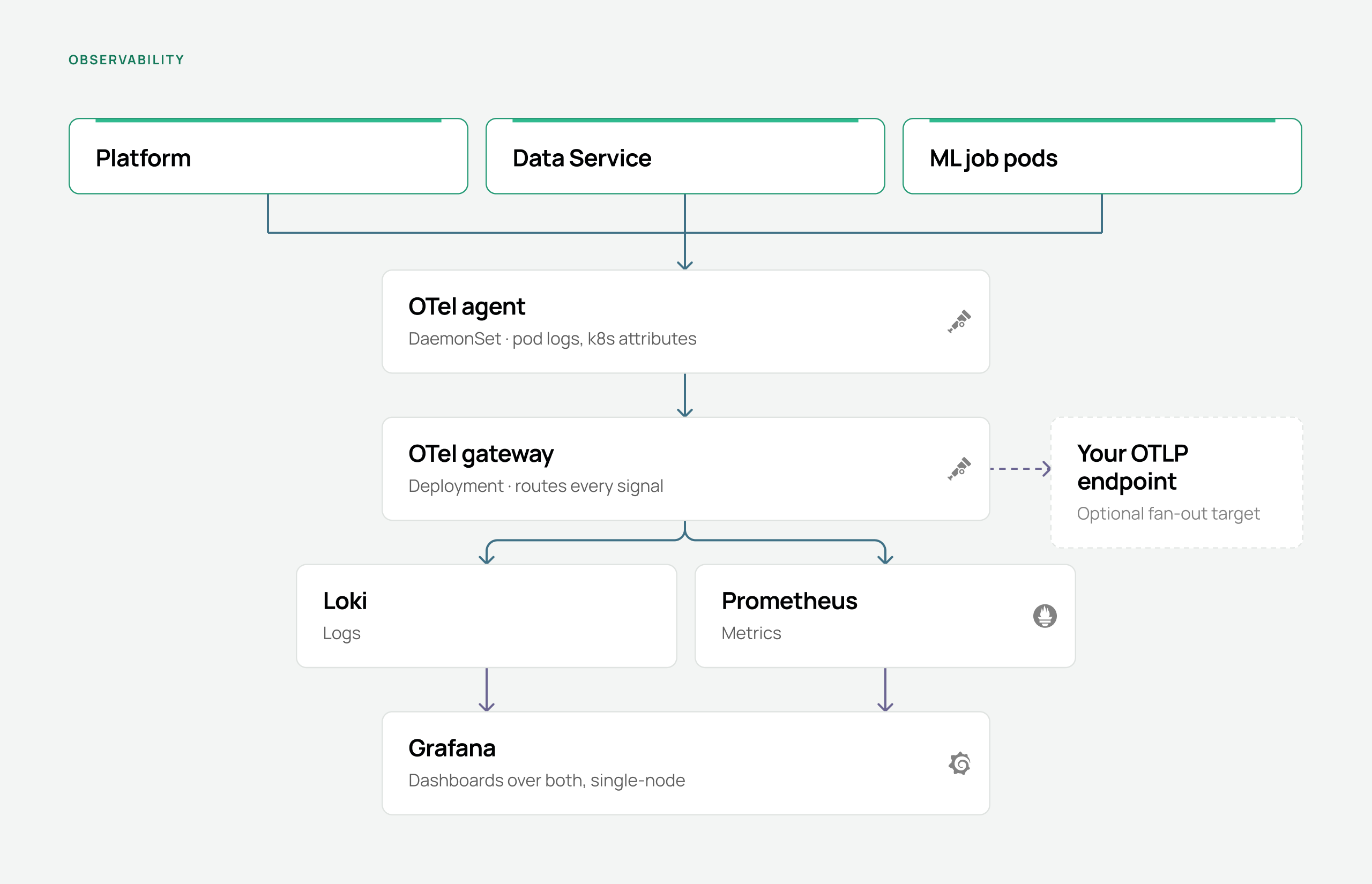
<figure><img src="https://1662811113-files.gitbook.io/~/files/v0/b/gitbook-x-prod.appspot.com/o/spaces%2FBXg3gZLR0e2Q8SzeQmql%2Fuploads%2Fgit-blob-562a05f589bfe5973ab8449aa7545f201a4dbc63%2Frc-arch-observability.png?alt=media" alt="The observability pipeline: the Platform, Data Service and ML job pods emit signals to an OTel agent running as a DaemonSet, which forwards to an OTel gateway; the gateway exports to Loki for logs and Prometheus for metrics, both read by Grafana, and can optionally fan out to an external OTLP endpoint"><figcaption><p>Every signal routes through the gateway, which can fan out to your own collector as well as the local backends.</p></figcaption></figure>

The platform ships an opt-in, in-cluster observability stack, deployed by the operator from `spec.config.observability`. It is off by default.

| Component    | Role                                                                                            |
| ------------ | ----------------------------------------------------------------------------------------------- |
| OTel agent   | DaemonSet. Collects pod logs with the filelog receiver and tags them with Kubernetes attributes |
| OTel gateway | Deployment. Every signal routes through it before export                                        |
| Loki         | Log storage, default 10Gi                                                                       |
| Prometheus   | Metric storage, bundling node-exporter and kube-state-metrics                                   |
| Grafana      | Dashboards over both, single-node, default 2Gi                                                  |

The Platform and Data Service are instrumented with OpenTelemetry. The Data Service reads `OTEL_EXPORTER_OTLP_ENDPOINT` and honours `OTEL_SDK_DISABLED`.

Both Prometheus and Loki retain data for 7 days unless you set `retentionDays`, and their persistent volumes use `spec.cloud.storageClass`.

To ship signals to your existing tooling, configure the gateway's forward target with a base URL — for example `https://otel.example.com` — plus basic-auth headers if it needs them. Forwarding is in addition to the local Loki and Prometheus backends, not instead of them.

***

## Security posture

The platform runs entirely inside your cluster. RootCause has no inbound access to it, no control plane in your environment, and no copy of your data.

| Area                  | Position                                                                                                                                              |
| --------------------- | ----------------------------------------------------------------------------------------------------------------------------------------------------- |
| Data location         | Datasets, digital twins, models and application data stay in your bucket and your databases                                                           |
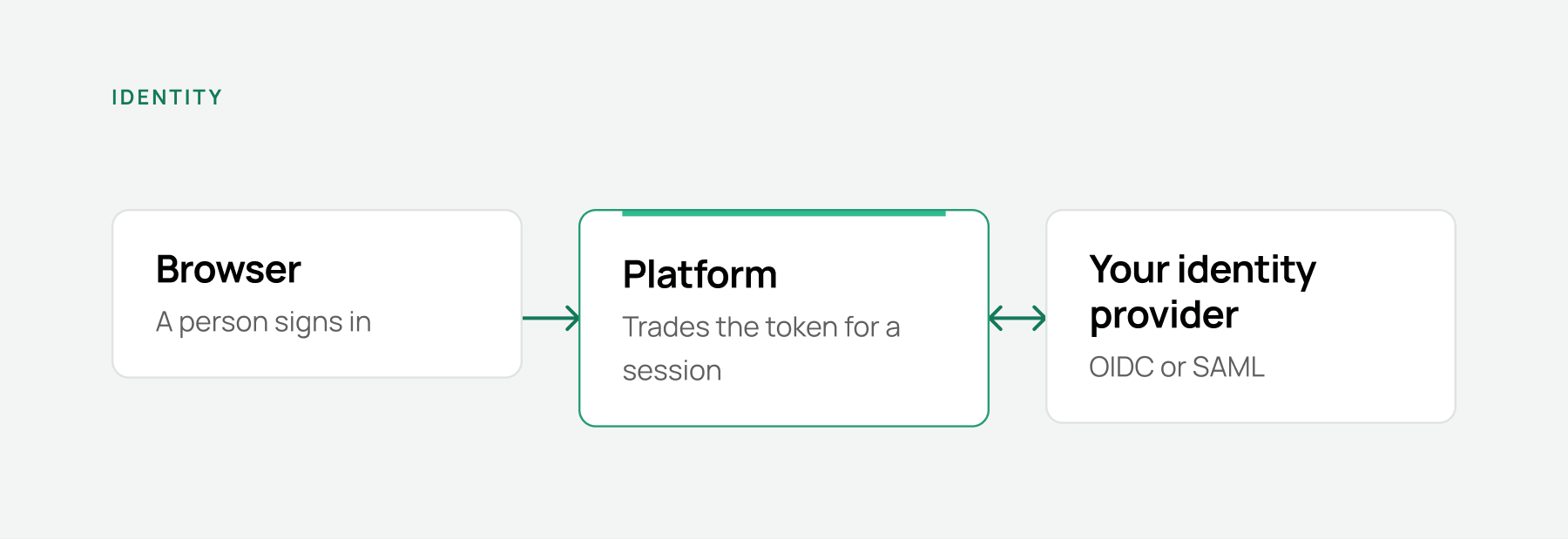
| Authentication        | Delegated to your identity provider over OIDC or SAML. The platform stores no password unless you choose managed FusionAuth                           |
| Authorisation         | API keys are scoped per workspace and per permission scope. See [API Access](/api-and-integrations/api-access.md)                                     |
| Secrets               | Held as Kubernetes Secrets in your namespace, generated by the operator at install                                                                    |
| Connector credentials | Encrypted before storage and redacted on read. The API never returns them                                                                             |
| Transport             | TLS terminates at your ingress controller, under one wildcard or per-host certificate                                                                 |
| Cluster permissions   | The Data Service service account manages Jobs in its own namespace and reads pods, pod logs and events, plus read-only node visibility for scheduling |
| Registry access       | A GitLab deploy token limited to the `read_registry` scope                                                                                            |

### Authentication

<figure><img src="https://1662811113-files.gitbook.io/~/files/v0/b/gitbook-x-prod.appspot.com/o/spaces%2FBXg3gZLR0e2Q8SzeQmql%2Fuploads%2Fgit-blob-0882e8e4128a6301986b7c73a9302e4a6a623212%2Frc-arch-identity.png?alt=media" alt="The identity flow: a browser reaches the Platform, which redirects to your identity provider over OIDC or SAML and trades the returned token for a session"><figcaption><p>The Platform trades a token for a session; no password is stored in the platform.</p></figcaption></figure>

| Option             | When it applies                                                                         |
| ------------------ | --------------------------------------------------------------------------------------- |
| External OIDC      | Recommended. Entra ID, Okta, Auth0, Google Workspace or any OIDC provider               |
| External SAML      | Your provider only speaks SAML, or your security team requires it                       |
| Managed FusionAuth | No identity provider yet, or a proof of concept. The operator deploys and configures it |

OIDC needs an issuer URL, client ID, client secret and well-known configuration URL. SAML needs the metadata URL or XML, entity ID and certificate.

Released images are promoted, not rebuilt. A commit that passes the gating suites on the default branch writes a content-addressed provenance attestation; the release tag verifies that record and restamps the image that was already built and scanned, so the artifact you run is the artifact that was tested.

***

## Dependencies, licences and scanning

**Vulnerability scanning.** Container images are scanned with Trivy at `HIGH` and `CRITICAL` severity on every merge request, on the default branch, and on every release tag. A green scan is attested and reused by the tag pipeline for 24 hours, so a tag re-verifies rather than rebuilds.

**Licence policy.** Nothing that ships carries a hard copyleft licence. Both repositories gate on it in CI and fail the pipeline rather than warn:

| Repository | Gate                                                                                                                                                                                 |
| ---------- | ------------------------------------------------------------------------------------------------------------------------------------------------------------------------------------ |
| Platform   | Fails on `GPL`, `AGPL` or `SSPL` in production dependencies. A dual-licensed package passes if one alternative is permissive. Dev-only and unknown licences are reported, not failed |
| Backend    | Fails on any GPL-family licence — GPL, AGPL or LGPL — in the runtime dependency tree                                                                                                 |

Both gates publish a full inventory as a CI artifact: every dependency, its licence and its project URL. The most recent platform scan covered 2,067 packages, overwhelmingly MIT, Apache-2.0, ISC and BSD.

**Advisories.** Dependency advisories are checked in CI. An advisory can only be allowlisted with a written justification and a review-by date, and a separate hygiene job fails the pipeline when an allowlist entry goes stale.

**Minimum versions.**

| Component  | Version                              |
| ---------- | ------------------------------------ |
| Kubernetes | 1.26+                                |
| Helm       | 3.12+                                |
| PostgreSQL | 15.0+                                |
| MongoDB    | 8.0+, deployed with MongoDB Search   |
| Redis      | 7.2.4+                               |
| Temporal   | 1.26.2+                              |
| FusionAuth | 1.57.1, when the operator deploys it |
| LiteLLM    | Pinned per release                   |

***

## Data retention

| Data                                     | Where it lives                                     | How long it is kept                                                         |
| ---------------------------------------- | -------------------------------------------------- | --------------------------------------------------------------------------- |
| Datasets, digital twins, trained models  | Your object storage                                | Until you delete them                                                       |
| Workspaces, ontologies, application data | MongoDB                                            | Until you delete them                                                       |
| Workflow history                         | Temporal, on PostgreSQL                            | 3 days                                                                      |
| ML job pods                              | The cluster                                        | Removed 60 seconds after completion, configurable with `ML_JOB_TTL_SECONDS` |
| Logs and metrics                         | Loki and Prometheus, when observability is enabled | 7 days by default, set with `retentionDays`                                 |
| Grafana dashboards                       | Its own volume                                     | Persist across restarts                                                     |
| Telemetry received by RootCause          | RootCause                                          | Per your agreement                                                          |

Deleting a dataset removes it from the bucket and from MongoDB. Object storage lifecycle rules, backup schedules and snapshot policies are yours to set: the platform does not impose or override them.

***

## Next steps

[Requirements](/installation-and-deployment/requirements.md) is the checklist for your infrastructure team. The [Deployment Guide](/installation-and-deployment/deployment.md) walks through the install.